  |








Library Users Guide[For the General Public]
- Terms and Conditions of Use
- One-Day Use
- Long-Term Use
- Entry and Exit
- Use of Facilities
- Use of Material
- Other Services
- How to Enter the Building
- Parking *Users with a library user’s card
- Evacuation Route
1. Terms and Conditions of Use
JAIST Library is open 24 hours a day, 365 days a year to meet the needs of an all-day research environment, and the general public is welcome to use the library materials and services such as photocopying. Please observe the following rules when using the library.
- Eating and drinking are not allowed in the library including the Browsing Area (only drinks in sealable bottles with lids are allowed to be brought in for hydration). Please use J-BEANS in the Institute Hall.
- Smoking is prohibited on the campus, including the library.
- Please be quiet and do not talk outside the group study spaces. Even in the group study space, please refrain from conversations that are not study-related or louder than required.
- Don't leave your valuables unattended when you leave your seat. Please carry them with you at all times. If you are away from your seat for longer than 1 hour, please take your luggage with you. If you leave your luggage unattended for an extended period of time, you will be warned and your luggage will be removed from the seat. (All the printed materials and notes are disposed when we remove your luggage.)
- Please handle library materials and equipment with care. You have to compensate for any loss, damage, or defacement.

2. One-Day Use
If you want to use the library only on the day of your visit, please come to the information counter during the following hours and fill out the application form for one-day use. You can use the library until 22:00 on the day.
Reception Hours 8:30-17:00 on weekdays (except holidays)- * Except summer holidays, October 1, December 29 - January 3
3. Long-Term Use
If you want to use the library for a long period of time, you may have a library user’s card.
- If your current address is in Japan, you can apply.
- You can borrow books.
- You can use the library 24 hours a day.
(Under 19-year-old users can use the library only from 8:30 to 22:00.)
How to Apply
Please bring the following documents to the information counter and fill out the application form for long-term use of the library during the reception hours listed below.- We cannot issue the card if the required documents are incomplete.
- If you apply for the card for the first time,please come to the library in person.
- Students in high school and below or those under 18 years old must have a parent or guardian’s signature and seal.
Required documents for application
- Documents verifying name, current address, and age (driver's license, My Number Card, residence card, student ID, etc.)
- For students (including junior high school, high school, university, vocational school, and various kinds of school), documents proving enrollment
Reception Hours 9:00-16:30 on weekdays (except holidays)
- Except summer holidays, October 1, December 29 to January 3
Library User's Card
- The expiration date is on April 30 of the fiscal year following application.
- Renewal procedures are required for continued use (free of charge).
[Details of Renewal Procedure] - For reissuance due to damage, the damaged library user’s card must be exchanged (free of charge).
- For reissuance due to loss, a reissuance fee of 1,000 yen will be charged.
4. Entry and Exit
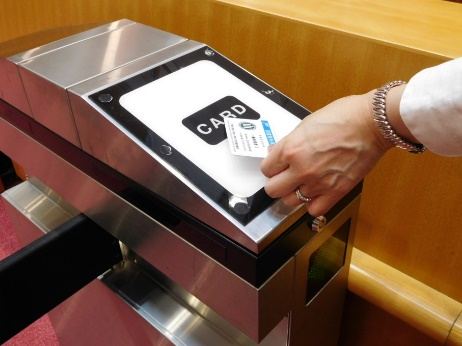
When leaving the library, please exit through the gate on the opposite side. The library card is not required.
5. Use of Facilities
Air Conditioning
| Group Study Space (New Wing)
|
||||
| Audio Visual Room/Reading Room
Throughout the year (8:30 - 22:00) Manual operation |
- During manual operation, the air conditioning is automatically shuts off every hour. Please turn it back on again if you continue using it. And please be sure to turn it off when leaving the room.
| Areas not listed above
Summer/Winter(8:30 - 20:00) Automatic operation on weekdays |
Lighting
The lighting in the library is operated by motion sensors, which will be turned off automatically when there is no response for 30 minutes.The lights in the carrels (individual reading desks) are manually operated, so be sure to turn off the light when you leave the library.
Audio Visual Room (2F/Old Wing)
There are booths where you can use CDs and DVDs. There is a large-sized television set where you can watch TV programs of BBC, CNN and The Open University of Japan. Please use a headset to listen to the programs.Rare Books Room (2F/Old Wing)
Classics of natural science and philosophy are displayed and stored in the library. Please inquire at the information counter when you would like to see them (9:00-17:00 on weekdays).Learning Commons "J-BEANS" (1F/Institute Hall)
This room is a multipurpose space set up as Learning Commons (a place for sharing to learn together). It can be used freely for reading, resting, etc. Eating and drinking are allowed (no alcohol is allowed).| Open Hours | 8:30-22:00 on weekdays * Your library user’s card is required to use the room after 20:00. * Not available on weekends, national holidays and JAIST holidays. |
6. Use of Materials
Browsing
All the books and materials in the library are open to the public and you can use them freely. Please return them to their original location by yourself after use. If you can't find the location, please put them on the “Return Rack“。How to Search for Materials
You can search for books and journals held by JAIST. Use JAIST OPAC on the information search terminals installed on each floor of the library or on the library’s website.https://wwwlib.jaist.ac.jp/?lang=english
Borrowing
Please use a self-checkout machine on the 1st floor.
Materials available for loan Green Bunko (General books)(1F), Specialized books (2F,3F), etc.- You cannot check out journals, textbooks, reference books, and lab materials.
Borrowing Limits
Loan period 14 days / Number of Materials 5 vols.
- You need your library user’s card to use this machine.
- Please put one book on the machine at a time.
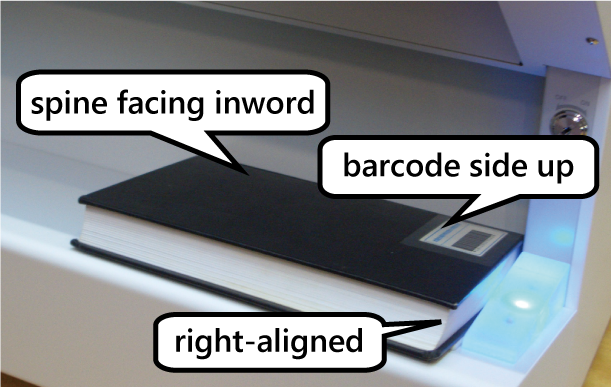
- Put a book “barcode side up with the spine facing inward”. Otherwise, a buzzer will sound at the exit gate since the security system is not released.
- If you are unable to use the machine due to a system error or something, please fill in the "Book Borrowing Record" on the right side of the machine.
Renewing Loan Period
If you renew loan period, you can continue to borrow books for another 14 days. Please ask us at the information counter (8:30-17:00 on weekdays), by e-mail or phone.
- You can renew the materials once if no one else has reserved them.
- You cannot use a self-checkout machine for renewing.
Returning
Please drop books in the "Book Return Box" located around the entrance of the library or near the browsing area. If the book does not fit in the box, please hand it over to a library staff member. If the book is placed on the return rack or shelf, it will not be processed for returning.
Reservation
Materials that are out on loan can be reserved at the information counter (8:30-17:00 on weekdays), by e-mail or phone.
| Number of Materials | up to 2 vols. |
| Hold Period | 1 week after the notice |
We will contact you when the reserved material is available for loan. Please come to the information counter to pick it up (8:30-17:00 on weekdays).
7. Other Services
Photocopying
We can make photocopies of library materials for you under the Copyright Law. Please bring the materials you want to photocopy to the information counter during the reception hours listed below. If there are many materials to be copied, please bring them to the information counter early because it will take some more time to copy them.
- Books may be copied up to half of all the pages. Journals may be copied, provided that the next issue has been published or three months have passed since publication.
- Only one copy of each material per person is allowed for your own investigation or research.
| Copy Fees per page | B&W ¥35 / Color ¥100 (incl. tax) |
| Reception Hours | 8:30-14:30 on weekdays |
8. How to Enter the Building
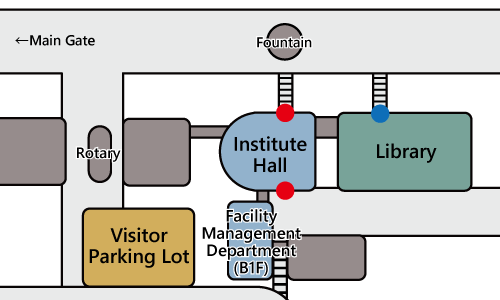
Use the entrance of the Institute Hall (See ● below) or the library main entrance (See ● below) from 8:30 to 17:00 on weekdays to enter the building of the library.
Users with a Library User's CardAll the entrances are locked during the night (from 20:00 to 7:30 the next morning) and on holidays (except from 10:00 to 15:00 on Saturdays), but you can enter the building of the library from the Institute Hall (See ● below) with your library user's card.
9. Parking * Users with a library user's card
Please park your car in a visitor parking lot. You need to present a "parking permit" when parking. Please obtain a parking permit from Facility Management Department of JAIST.
| Reception Hours | 9:00-12:00, 13:00-16:00 on weekdays |
| Items Required | Library user's card, the registration number of your vehicle |
10. Evacuation Route
See Evacuation Route.

