




Copilot
Microsoft Copilot is a generative AI tool provided by Microsoft.
Microsoft Copilot Chat, which is available at JAIST, is a web browser–based conversational AI service.
By signing in with a university account, users can access the service with Enterprise Data Protection (EDP) enabled.
Eligible Users
Eligible users are those who qualify for the Microsoft EES (Enrollment for Education Solutions) agreement.
Microsoft Enrollment for Education Solutions (EES)
How to Access
Please use Microsoft Copilot Chat via the following URL:
https://m365.cloud.microsoft/chat/
Important Notes
Enterprise Data Protection (EDP)
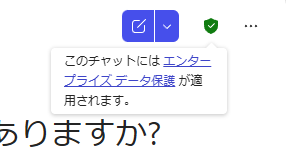
When Copilot is used while signed in with an organizational account, Enterprise Data Protection (EDP) is applied. In this mode, prompts entered by users and generated responses are designed not to be used for training AI models and are not subject to secondary use by Microsoft.
When using Copilot, please sign in with your JAIST Microsoft account. If you are prompted to choose between a Personal account and a Work account, select Work.
When a green shield icon appears in the upper-right corner of the Copilot interface, Enterprise Data Protection is enabled and active.
Handling of Confidential Information
While Enterprise Data Protection provides an additional level of protection when using Copilot, it does not automatically make all information suitable for processing in a cloud service.
Depending on the sensitivity of the information involved, the use of cloud-based AI services may not be appropriate. In particular, users should carefully assess whether Copilot may be used for highly confidential research data, unpublished information, personal information, or other sensitive data, in accordance with the JAIST Information Classification Guidelines and other applicable regulations and policies.
Users are responsible for determining whether the information they enter is appropriate for processing in Copilot.
In addition, when using Copilot for laboratory or research activities, please follow the instructions and policies established by your academic supervisor or laboratory.
Microsoft 365 Copilot (Additional License Required)
Microsoft 365 Copilot is a paid generative AI service provided by Microsoft.
In addition to Microsoft Copilot Chat, which is available under the university's Microsoft licensing agreement, Microsoft 365 Copilot offers enhanced capabilities and expanded usage scenarios through deeper integration with Microsoft 365 applications and organizational data.
A separate license is required to use Microsoft 365 Copilot.
The cost of the license is borne by the user's department, laboratory, or other affiliated unit.
Application
To request a Microsoft 365 Copilot license, please complete and submit the following form.
* Applications are accepted from faculty and staff members only.
* The applicant will be assigned as the initial license manager.
Notes on Licensing and Subscription
- Subscriptions are renewed annually at the end of February. Due to the terms and timing of the university's Microsoft licensing agreement, there may be cases where continuous, uninterrupted use of Copilot cannot be guaranteed across renewal periods. We appreciate your understanding.
- Licenses cannot be canceled during the subscription period. Once activated, the license must be maintained through the end of February of the applicable subscription year.
- During the subscription period, the license may be reassigned to a different user as needed.
License Management
Licenses are managed on a per-group basis, and each group must designate one License Manager.
The initial License Manager will be the person who submits the purchase request. The License Manager may be changed at a later date.
Within the number of licenses purchased by the group, the License Manager can assign and remove licenses for eligible users.
Users eligible to receive a license must be authorized users of JAIST Microsoft services.
A person may not serve as the License Manager for more than one group.
Process Overview
- Determine the number of licenses to be purchased and the funding source within the group.
- One member of the group submits a request using the application form.
- The CII forwards the request details to the Procurement Section, which then places the order.
- Once the licenses have been delivered, the CII sends a notification email to the applicant (the License Manager) indicating that the service is ready for use.
- The License Manager assigns licenses to users through the designated management application.
Example Use Case
If User A of the XX Section requests three licenses starting in July 2026, the required budget amount will be:
[8 months](from July 2026 through the end of February 2027) × [3 users] × [unit price]
Following the purchase, User A will be designated as the initial License Manager.
Suppose that the three licenses are initially assigned to User A, User B, and User C of the XX Section.
If User C transfers to another position in October, the license subscription for one user cannot be canceled during the subscription period.
However, User A, acting as the License Manager, can use the license management application to remove the license assignment from User C and reassign it to User D or another eligible user.