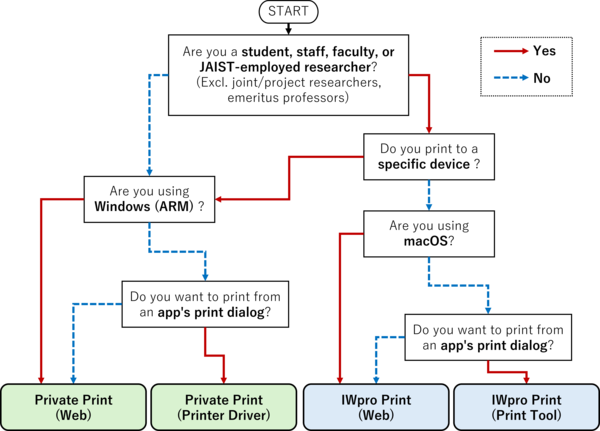



How to Use by OS
Printing is not limited to a single method; users need to choose the most appropriate option based on their needs and typical usage scenarios.
Please note that some features may not be available depending on the operating system.
Refer to this page to compare OS compatibility and required features, and select the most suitable printing method.
Windows
- IWpro Print (For using multifunction printers at any location)
Note: Not available to some users.- Print Tool
You can print using the "Print" function from applications such as Excel and other software. - Web
Convert the file into a supported format such as PDF, then upload it via the IWpro web page to print.
- Print Tool
- Private Print (For using a specific multifunction printer)
- Printer Driver
You can print using the "Print" function from applications such as Excel and other software. - Web
Convert the file into a supported format such as PDF, then upload it via the IWpro web page to print.
- Printer Driver
Windows (ARM)
- IWpro Print (For using multifunction printers at any location)
Note: Not available to some users.- Print Tool
You can print using the "Print" function from applications such as Excel and other software. - Web
Convert the file into a supported format such as PDF, then upload it via the IWpro web page to print.
- Print Tool
- Private Print (For using a specific multifunction printer)
- Web
Convert the file into a supported format such as PDF, then upload it via the IWpro web page to print.
- Web
macOS
- IWpro Print (For using multifunction printers at any location)
Note: Not available to some users.- Web
Convert the file into a supported format such as PDF, then upload it via the IWpro web page to print.
- Web
- Private Print (For using a specific multifunction printer)
- Printer Driver
You can print using the "Print" function from applications such as Excel and other software. - Web
Convert the file into a supported format such as PDF, then upload it via the IWpro web page to print.
- Printer Driver
Chromebook
- IWpro Print (For using multifunction printers at any location)
Note: Not available to some users.- Print Tool
You can print using the "Print" function from applications such as Excel and other software. - Web
Convert the file into a supported format such as PDF, then upload it via the IWpro web page to print.
- Print Tool
- Private Print (For using a specific multifunction printer)
- Web
Convert the file into a supported format such as PDF, then upload it via the IWpro web page to print.
- Web
iPad, iPhone, Android
You can print by downloading the mobile application (Print Utility) from the following URL:
https://www.fujifilm.com/fb/ja/support/multifunction-printers/tool/printutility
- IWpro Print
Note: Not available to some users.- Tap the settings button (gear icon) in the upper right corner of the app and select “FUJIFILM IWpro Print.”
- Enter your account information and log in.
- Select [FUJIFILM IWpro Print], then choose the document/photo you want to print.
- Reference: Uploading files using the mobile app (Print Utility)
https://opencds-fb.fujifilm.com/gen/fbiwpro_aux/help/ja/manual/prt/html/prt_03_04010100.html
- Private Print
- Tap the settings button (gear icon) in the upper right corner of the app and select “Printer Authentication Information.”
- Enter your User ID.
- If [No printer/MFP registered] is displayed, tap it and register a device using either:
[Manual Setup], or [Register the printer in front of you] - Select [Print], then choose the document/photo you want to print.
Reference: Choosing a Printing Method (Yes/No Guide)