




Usage (IWpro Print)
This page explains how to use the multifunction printers(MFPs) at JAIST. Printing is handled through FUJIFILM's "FUJIFILM IWpro" (hereinafter "IWpro"). The service supports on-demand printing: you register your print data with IWpro in advance, then authenticate and print at any MFP within JAIST.
- Reference
- Overview of FUJIFILM IWpro | FUJIFILM IWpro User Guide(external site)
- Location of Multifunction Printers|学内情報 (Internal Use Only)
Target users
Students (including non-regular students), staff members, faculty members, and researchers employed by JAIST
* You can confirm your eligibility under “Available Services” in your user profile.
* Joint researchers, project researchers, and emeritus professors are not eligible for the printing methods described on this page.
They may instead use the “Private Print” option, which allows direct submission of print data to a multifunction printer.
About Accounts
This page involves two types of accounts. Please note that they are easy to confuse.
- JAIST Account(User Account)
- The account issued by JAIST for using JAIST internal systems such as email. It is used for logging in to the MFP itself, and for logging in to the MFP from a browser when printing large files.
- IWpro Account
- The account for FUJIFILM's IWpro service. It is used to log in to IWpro and to upload print data. This is a separate account from your JAIST Account (User Account).
- If you forget your password, change it from the password reset page, in the same way as during preparation (see the "Required | Changing Your IWpro Password" procedure).
Preparation | Changing Your IWpro Password
Your IWpro account is separate from your JAIST Account (User Account). Be sure to change your password the first time you use it.
- <Note>
- You do not need to register your IWpro account yourself.
- It has already been created by the Information Infrastructure Center, so you only need to change your password before first use.
- Password Reset Page
- Setting Your FUJIFILM BI Direct Password | FUJIFILM Business Innovation (external site)
- How to Use
- Operation Manual (Web) | FUJIFILM IWpro User Guide (external site)
Registering Print Data
Registering Print Data (Web)
Log in to IWpro and upload your PDF or Office files. The registered data can then be authenticated and printed at any MFP (on-demand printing).
- Login Page (IWpro)
- Log in to IWpro | FUJIFILM Business Innovation (external site)
- How to Use
- Operation Manual(PDF/1.46 MB)(see pp.7–8)
- Operation Manual (Web) | FUJIFILM IWpro User Guide (external site)
Registering Print Data (Print Tool)
If you have installed the Print Tool (see the "Optional | Installing the Print Tool" procedure), you can send data directly to IWpro from the print dialog of applications (such as Microsoft Office and Adobe Acrobat). The registered data can then be authenticated and printed at any MFP (on-demand printing).
- How to Use
- Operation Manual(PDF/1.46 MB)(see pp.17–20)
- Operation Manual (Web) | FUJIFILM IWpro User Guide (external site)
Optional | Installing the Print Tool
The Print Tool lets you send data directly to IWpro from the print dialog of applications (such as Microsoft Office and Adobe Acrobat), using the same steps as normal printing. Download the installer from IWpro and install it.
- <Note>
- This is not required if you use web-based registration (see the "Registering Print Data (Web)" procedure).
- It is already installed on the JAIST Cloud Desktop.
- Getting the Installer (IWpro)
- Log in to IWpro | FUJIFILM Business Innovation (external site)
- How to Use
- Operation Manual (PDF/1.46MB)(see p.16)
- Operation Manual (Web) | FUJIFILM IWpro User Guide (external site)
[For macOS Users]
The IWpro print tool is not available for macOS.
If you wish to use location-free printing (printing without specifying a multifunction device),please use the “Register Print Data (Web)” option.
If you do not mind specifying the target multifunction printer directly, please consider using “Private Print.”
Authentication of MFP
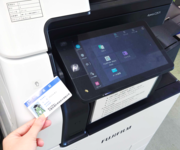
All functions of the Printing Device are available via JAIST Account.
Users who has JAIST Account can use his/her ID Card (Staff ID Card/Student ID Card) as Authentication Card for printing device.
If you find any kind of error during authentication, please refer the following points.
- Users who has JAIST Account
Please request us, Research Center for Advanced Computing Infrastructure (isc-query@jaist) to register your ID Card. At the time, don't forget to inform us your mail address and Staff ID Number.
For urgent print, ID - password based authentication is available via the *認証* button on upper right of the front panel. - Users who don't has JAIST Account
Please ask your professor or person in charge to request us for a rental printing card.
An operation manual is provided at the MFP itself. You can also check basic operations there.
- How to Use
Rental Printing Card
Users who don't have JAIST Account can use Rental Printing Card for authentication of printing system.
* Rental cards will be lent out to the host faculty/staff. Faculty and staff are requested to send an e-mail in advance to inform us of the user and the loan period.
* As a general rule, one rental card can be lent per faculty member.
Large-File Printing (When Registration with IWpro Is Not Possible)
If your print data is large, it may exceed the file size limit (around 1.2–3.6 GB) and cannot be registered with IWpro, meaning on-demand printing is not available. In that case, access the MFP's IP address from a browser and register the print data directly to the MFP.