




Usage (Private Print)
This page describes how to use “Private Print,” a method for printing to a specific multifunction printer (MFP).
Private Print is a printing method in which you specify the IP address of the target MFP and send print data directly to that device.
When the printer to be used is predetermined, it offers a simpler alternative to IWpro Print.
Even if the selected multifunction printer is unavailable—such as when it is currently in use—you can select the same print data and output it from another available multifunction printer without having to register the job again (Anywhere Private Print).
This method also allows you to print large files that cannot be registered in IWpro due to file size limitations (approximately 1.2–3.6 GB).
In addition, Private Print is available for users who are unable or do not wish to create an IWpro account.
Target users
JAIST members
*Even if you are not eligible for IWpro Print, you can still use Private Print.
Preparation| Checking the MFP’s IP Address
To use Private Print, you will need the IP address or hostname of the multifunction printer you intend to print to.
For instructions on how to check the IP address, please see below.
https://www.fujifilm.com/fb/ja/support/callcenter/ccfaq/ccfaq0033
You can also check the IP address and host name for each multifunction device in the "List of Updated Multifunction Devices" below.
2026 Multifunction Printer List
※Japanese only. English version is being prepared.
Sending Print Data
Printing method from a web browser
- How to Use
- Operation Manual(PDF/1.46 MB)(see pp.9–15)
- <Important>
- When logging in to the MFP from a browser, use your JAIST Account (User Account), not your IWpro account.
- The file formats that can be directly registered to the multifunction printer are PDF, PostScript, PCL, JPEG, TIFF, XPS, and DocuWorks.
Printing method using printer driver
Printing via printer drivers is currently under verification; however,
we have confirmed that it may be possible to use the service by installing the driver and specifying a printer directly.
This is a trial method, but if you are interested, please try the procedure described below:
* At present, the guide is available in Japanese only. An English version will be provided at a later date.
Authentication of MFP
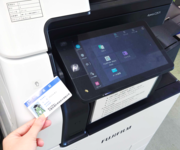
All functions of the Printing Device are available via JAIST Account.
Users who has JAIST Account can use his/her ID Card (Staff ID Card/Student ID Card) as Authentication Card for printing device.
If you find any kind of error during authentication, please refer the following points.
- Users who has JAIST Account
Please request us, Research Center for Advanced Computing Infrastructure (isc-query@jaist) to register your ID Card. At the time, don't forget to inform us your mail address and Staff ID Number.
For urgent print, ID - password based authentication is available via the *認証* button on upper right of the front panel. - Users who don't has JAIST Account
Please ask your professor or person in charge to request us for a rental printing card.
An operation manual is provided at the MFP itself. You can also check basic operations there.
- How to Use
Rental Printing Card
Users who don't have JAIST Account can use Rental Printing Card for authentication of printing system.
* Rental cards will be lent out to the host faculty/staff. Faculty and staff are requested to send an e-mail in advance to inform us of the user and the loan period.
* As a general rule, one rental card can be lent per faculty member.
Outputting Print Data
The steps to output the data registered when sending print data are as follows.
To print using the multifunction device where the data was registered (Private Print)
- Log in to the multifunction device where the print data was registered.
- Select the [Private Print] icon on the device's home screen.
- Select the data you wish to print from the displayed list.
- Press [Start] to begin printing.
To print using a multifunction device other than the one where the data was registered (Anywhere Private Print)
- Log in to the multifunction device you wish to use for printing.
- Select the [Anywhere Private Print] icon on the device's home screen.
- Select the data you wish to print from the displayed list.
- Press [Start] to begin printing.